computer science basic TERMS
Graphics
Grayscale image
use 0-255 values, 28, 0 used for black and 255 used for white
RGB:2563=16 million colors. Quality is 8,16,32 bit
Firewall
prevent unwanted trafic into the network.it contains access control list that contains ip,permission,protocol,destination,port fields.
| ip address | permission | protocol | destination | port |
|---|---|---|---|---|
| 192.168.1.11 | allow | tcp | any | 80 |
| 192.168.1.12 | allow | udp | 10.1.1.1 | 23 |
| any | deny | tcp | any | 80 |
firelwall rule can be port no,ip address,keywords,domain name,protocol.in above rules only port 80,23 are allow.
Types
- Host based firewall
- A software on host machine ,work as firewall
- Network based firewall
- combination of hardware and software that protects whole network ie some router have built in firewall
Wireless security
- WEP (Wired Equivalent privacy): developed in 1999,40bit encryption key,easy to hack.
- WPA (WI-FI protected Access): strong encryption,use TKIP(temporal key integrity protocol) that changes keys.
- WPA 2 strong security,use AES (Advance encryption standard).Only brute force work.
- WPA 3 next generation,introduced in 2018.
WPS (WIFI Protected Setup) method join secure wireless network with easy methods ie push button or PIN.
Access control or mac filitring method MAC address, used to connect with wifi.
Mesh WI-FI
- If a router has week signals, we use wifi extender (hardware) that have his own ssid & password.
- WIFI Extender: extends the range of wifi signals.
- it cant amplify signals,but it get access from near router and broadcast its signals.
- ie ssid:PTCL is main router and ssid:PTCLext1 is extender
- Mesh wifi: A group of routers or wifi points,that are placed in different locations inside a place.They are connected with each other wirelessly.
- A signle SSID (network name) is used for all wifi points
DMZ (Demilitarized zone) used to improve the security of network.
- The data before (ie web server) firewall is called DMZ Zone.
- Goto roter config and setup DMZ settings.
BIOS, CMOS, UFFI
- BIOS (basic input output system)
- Bios is firmware that built on motherbord that initializes the computer hardware as computer is being booted
- then searched for boot devices.
- BIOS run POST (power on self test ) when computer is turn on first time
- if POST is passed Operating system is loaded
- it is non volatile.
- CMOS
- DATE & time, hardware settings,boot sequence setting in BIOS is stored in CMOS. ie cell on motherbord
- its volatile & when bettry is removed BIOS configration return to default settings
- UEFI (unified extensible firmware interface)
- New version of BIOS, ie it has GUI
NAS (network attached storage) vs SAN (storage area network)
- NAS: a centralized storage device for storing data on network.its single point of faileur.ie collection of 10 HDD
- SAN: a high speed dedicated network that store and provide access to large amount of data.its use servers,switches & HDD's & use FIBER optic ,& very expensive
ARP (address resolution protocol)
- protocol used to resolve ip addresses to mac addresses.
- MAC ADDRESS is needed for communication on LAN
- check in cmd "arp -a" to check arp cache
- Computer a broadcast (who is 1.1.1.1 i need MAC) & 1.1.1.1 replies his MAC & communication take place.
- Now arp entries also stored in arp cache for next time communication
- Types of arp entriesDynamic entries (auto), static entries (arp -s 192.168.1.1 ff-gsd-33-dsf)
NAT (network address translation)
- translate ip addresses to another ip addresses due to limited amount of public ipv4 address
- 4294967296 ip's are not enough
- so engineers introduced NAT & private ip addresses
- types of ipv4 are public & private
- Public ip address: publically registered on internet.we must have an public ip for communication
- Private ip address: no publically registed, we cant access internet with it,only used in home or business (internally).
- we need to buy public IP by internet service providers to access internet that is expansive,wastage of IPs,un necessary
- if every device get public ipv4 address, than we ran out of IPv4
- So get public ip for main device (ir router) , and router will assign private IP's (using NAT) to our other devices
- In future we use ipv6 () instead of NAT and private IP addresses.
VLAN (virtual area Network)
- VLAN's can logically create several virtual networks to separate the network broadcast trafic.
- we make broadcast domain ie VLAN 10, VLAN 20.
VTP (Vlan Tranking Protocol)
- use to configure a switch
SMTP (simple mail transfer protocol)
- SMTP is protocol for sending emails.
- our message sended to smtp server,ie for gmail smtp.gmail.com is smtp server address
- Smtp server send email to Receipient email server
- Recipient download email using POP or IMAP protocols or use smtp server using web
- SMTP use TCP protocol
POP3 vs IMAP
- use for retrieving emails from email server
- POP3: post office protocol, only download emails to inbox. no sent items,no syncronization,
- IMAP: internet message access protocol, retrive emails, view emails, syncronizations also.
- incomming mail server : pop.gmail.com || smtp.gmail.com
Modem
- bring internet in home, use to demodulates (incoming analog to digital) and Modulates (outgoing digital to analog).
Routers
- Router passes internet connection to all of your devices.
- if <=4 devices no need of router, we will use four ports of modem
Printers
- Inkject: most comman,use ink, use tinny dots.
- Laser: high quality print,expensive,use toner,
- Dot matrix: old technology, noisemlow quality.use ink.
Defragmentation
- reduces the amount of fragmented files on hard drive
- save related data on same physical locations
- related files scatered on different locations is called Fragmentation
- you only have to do a defrag on mechanical hard drives.
hub,switch,router
- HUB: all devices receive a data packets,
- Switch: intellegent, send data packet only to destination port using switch
- hub and switch are used for LAN,not used to exchange data outside their own networks
- Router: routes data from one network to another based on ip address.Router reject packets of another networks.
- Hub & switch used to create network and router connect networks
CPU CACHE
- store copy of data from RAM, that used again & again
- L1 CACHE: very fast same as cpu,part of cpu,small size
- L2 CACHE: large than L1,slow than l1,cpu first read l1,than l2
- L3 CACHE: large than l2,slow than l2,cpu read it if data is not readed in l2
TCP (transmission control protocol)
- communication between two computers need to be reliable,successfully delivery,
- it is connection oriented protocol: need a connection before communication with following three steps
- sender send a message SYN
- reciever send SYN ACK to sender
- send again send ACK RECEIVED to reciver
UDP (user datagram protocol)
- Same as TCP but connection less.
- faster than TCP But not reliabe,no guarntee of sending data
Port forwarding
- Connect to specific computer or service within a private network
- remote desktop connection in microsoft windows
- router send your requesr if port is finded
- port 80 for web pages, 20,21 for ftp,443 for https
IP ADDRESS
- identifier for a device on a network
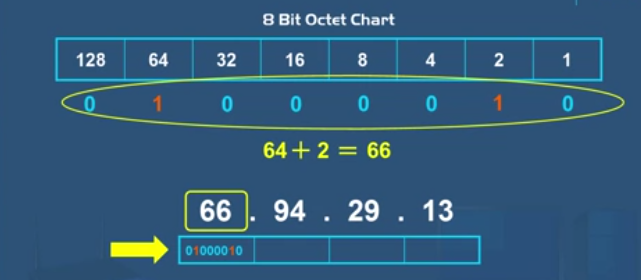
- ipv4 is 32 bits having for octects.
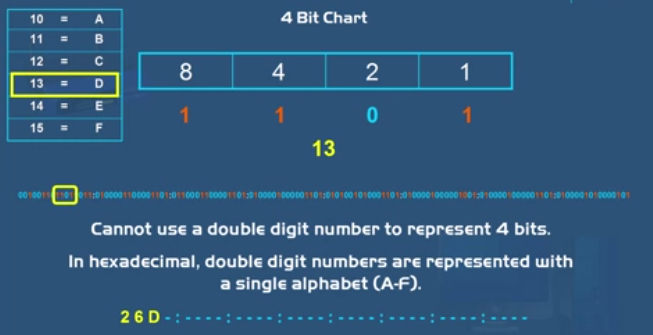
- ipv6 is next genration of IP address having 128 bits hexadecimals
- ipv6 have 8 sets of 16 bits
- each hexadecimal charter represent 4 bits
chipset
- collection of chips in a single case
- chipset contain many transisters,registers.